A) Introduction – top
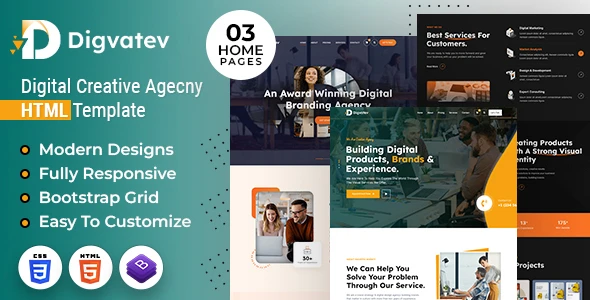
Introducing Digivatev HTML Template, our cutting-edge HTML template crafted exclusively for digital creative agencies, where innovation meets aesthetics to elevate your online presence. This sleek and responsive design is meticulously engineered to showcase your agency’s expertise in the digital realm. The template boasts a modern and clean aesthetic, with a focus on high-quality visuals and engaging content layouts. Showcase your portfolio with style using customizable grids and sliders that effortlessly display your work, leaving a lasting impression on potential clients. Integration of interactive elements and smooth animations adds a touch of sophistication, creating an immersive browsing experience that aligns with the dynamic nature of digital creativity. Its responsiveness ensures a seamless viewing experience across devices, catering to the diverse ways users engage with digital content. The inclusion of a contact form and strategically placed call-to-action buttons facilitates easy client interaction, converting website visitors into valuable leads.
It contains multiple Home Page layouts and about page layout and 06+ valid HTML5 page templates designs, different Blog page styles and Shop pages. Digivatev template features are coded with Bootstrap v4.0, HTML5 & CSS3 and unlimited color schemes. It’s compatible with all modern browsers and search engine friendly. So showcase your artworks and services with this awesome template!
How to Edit HTML Files? – top
We have included 06+ custom HTML templates like Home Page styles, About styles and Pricing, Services, Contact etc. Please open any HTML files with a text editor like Dreamweaver, Notepad or Notepad++ and edit any lines what you want.
C) How to Edit CSS Files? – top
We have included some custom CSS styles like custom.css (default). Please open any CSS files with a text editor like Dreamweaver, Notepad or Notepad++ and edit any lines what you want. For example if you want to edit your banner image open custom.css and look at “.banner-con” for banner image and change your image.
D) How to use Color Schemes? – top
Please open custom.css file from Digivatev/assets/css folder with a text editor and build your own colors. #f7a211 this is our primary color, you can search and replace all to your new color code.
G) How to use On Load Animation? – top
We are wow.js on load animation for our website. you can edit them by simply adding or changeing the predefined classes name.
jQuery Files
assets/js/jquery-3.7.1.min.js assets/js/bootstrap.min.js js/popper.min.js js/animation.jsPhotos
Enveto Elements Freepik PhotosIcons:
Font-Awesomefont:
Inter Lexend+Deca ManropeG) Resources Used – top
Global
Colors:
Primary: #f7a211
Secondary: #1a1819
Text: #666c84
Font Sizes:
h1 >> 75px
h2 >> 60px
h3 >> 40px
h4 >> 24px
h5 >> 24px
h6 >> 20px
p >> 20px
<!—
h6 >> 16px
P >> 16px
—>
Image Links:
https://elements.envato.com/collections/VHQS5F48ML https://www.freepik.com/free-vector/gradient-responsive-website-design-set_29838133.htm#&position=4&from_view=collections https://www.freepik.com/free-vector/gradient-e-commerce-website-template_30116535.htm#&position=3&from_view=collections https://www.freepik.com/free-vector/gradient-responsive-website-design-set_29838136.htm#&position=2&from_view=collections https://www.freepik.com/free-vector/flat-design-responsive-website-design_28747717.htm#&position=1&from_view=collections https://www.freepik.com/free-vector/furniture-shopping-app-interface_9907839.htm#&position=0&from_view=collections https://elements.envato.com/collections/U7KG2WVQZP https://elements.envato.com/collections/6S4UB9XC8W
Note: All images are used for preview purposes only. They are not part of the template and hence, not included in the final purchase files.
Once again, thank you so much for purchasing this template. As I said at the beginning, I’d be glad to help you if you have any questions relating to this template. No guarantees, but I’ll do my best to assist. If you have a more general question relating to the themes and templates on ThemeForest, you might consider visiting the forums and asking your question in the “Item Discussion” section.
Designing Media Team
Go To Table of Contents
Once again, thank you so much for purchasing this theme. As I said at the beginning, I’d be glad to help you if you have any questions relating to this theme. No guarantees, but I’ll do my best to assist. If you have a more general question relating to the themes on ThemeForest, you might consider visiting the forums and asking your question in the “Item Discussion” section.
Designing Media Team
