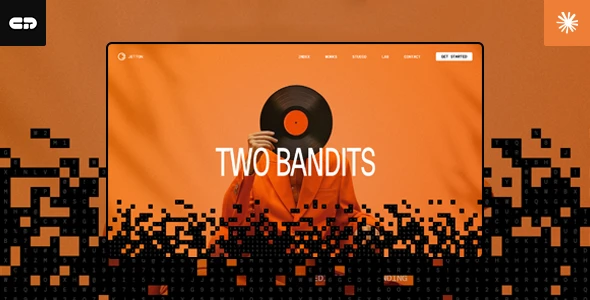
Jetton is a minimal portfolio and studio HTML template for creative agencies, independent designers, art directors, and digital studios. It combines a typography-led visual identity with interactive project storytelling, ASCII-inspired effects, GSAP motion, and seamless AJAX navigation. Built on the ClaPat Framework, Jetton gives creative work room to speak while making every interaction feel intentional.
Jetton is built on the ClaPat Framework, the front-end foundation behind ClaPat portfolio experiences. Its animation, scrolling, navigation, and interactive components are designed to work together as a cohesive system, not as disconnected visual effects.
Who Is It For?
Creative studios – present selected work, services, clients, and people in a unified studio website Independent designers and art directors – build an expressive personal portfolio with distinct visual character Digital agencies – showcase case studies with rich transitions and flexible project layouts Developers – customize HTML, CSS, and JavaScript directly, with access to the source filesTechnology Stack
GSAP – timeline-based animations, ScrollTrigger interactions, and Flip layout transitions Lenis – smooth scrolling coordinated with the animation system Vanilla JavaScript – custom interactions without jQuery HTML & CSS – editable page structure and styles, with design settings organized in CSS files ClaPat Framework – AJAX navigation, transitions, and reusable interactive behaviorIncluded Pages
17 HTML Pages – homepage, About, Contact, 404, Portfolio Grid, Portfolio Carousel, and 10 project pages Portfolio Grid – a project overview with category filters Portfolio Carousel – an alternative way to browse selected work 10 Project Pages – multiple content compositions for individual projects About & Contact – studio information, team and client presentation, and a PHP contact form Custom 404 – a dedicated error page matching the design systemPortfolio Features
Portfolio Grid with Filters – browse projects by category with an interactive filtering interface Portfolio Carousel – explore selected projects through a motion-driven carousel Project View Mode – switch between reading-oriented and visual project presentations GSAP Flip Transitions – animated changes between supported portfolio and project layout states Project Navigation – continue exploring the portfolio through project-to-project navigation Project Pages – 10 included pages for presenting case studies and creative work Portfolio Hover Effects – contextual image and cursor feedback on interactive project elementsASCII Visual System
ASCII Background – character-based visual layers for selected page sections ASCII Foreground – additional character-based effects layered into the visual experience ASCII Text Rendering – large display text rendered as part of the ASCII visual language ASCII Interaction – responsive effects that react to pointer movement in supported areas ASCII Preloader – character-based visuals integrated with the loading experience ASCII Configuration – component attributes and styling controls for visual customizationInteractions & Animations
AJAX Page Transitions – navigate between pages without a conventional full-page reload GSAP ScrollTrigger – coordinate animation sequences with scroll position Lenis Smooth Scrolling – consistent scroll behavior across supported pages Pinned Lists – scroll-driven sequences with large-scale typography Prompter Lists – animated rotating statements and typographic sequences Parallax Effects – depth and motion applied to supported media and elements Reveal Animations – content entrances synchronized with viewport visibility Interactive Hover States – visual feedback across buttons, links, and project itemsText Animations
Animated Typography – motion treatments for headings and editorial content Prompter Text – animated lines of studio statements Text Shuffle – character-based transitions on supported links and labels Scroll-Based Reveals – typography entering as content moves into view Fluid Typography – responsive text scaling through CSSComponents
Clients Slider – interactive client presentation Team Proximity – team section with proximity-based interactions Pinned Lists – editorial lists that respond to scrolling Prompter Lists – animated typography-based messaging Portfolio Grid – reusable project overview layout Portfolio Carousel – reusable motion-based portfolio layout Contact Form – PHP handler supplied for configuration Responsive Columns – reusable page composition classes and layoutsHeader & Navigation
AJAX Navigation – integrated page transitions Animated Menu – navigation with motion and responsive behavior Header Color States – visual adaptation to contrasting page backgrounds Dual Logos – light and dark logo assets supplied Responsive Navigation – layout adapted to smaller screensCustom Cursor
Interactive Cursor – custom pointer feedback across supported elements Contextual Labels – text prompts attached to interactive states Hover Feedback – cursor behavior coordinated with buttons, links, and portfolio elements Drag Feedback – interaction cues for supported draggable elementsPreloader
Animated Text Sequence – staged loading messages Progress Indicator – loading percentage displayed during the sequence ASCII Layer – ASCII-based visuals integrated into the loading experience Transition to Content – coordinated reveal when the page is readyTechnical Features
17 HTML Pages – including 10 individual project pages No Node.js Build Step – work with HTML, CSS, and JavaScript source files Local Server Recommended – AJAX navigation requires an HTTP environment for reliable local testing CSS Variables – centralized typography and visual settings in css/variables.css Responsive Layouts – layouts and interactions adapted to viewport sizes GSAP & Lenis – animation and smooth-scroll libraries included PHP Contact Handler – contact.php provided for server-side form processing Editable Source – customize markup, styles, and JavaScript Custom 404 Page – dedicated error layout Setup README – installation, customization, support, and license information includedWhat Makes Jetton Different
Minimal by design. Experimental by nature. Jetton pairs spacious, typography-led layouts with an unconventional visual language. The result is a portfolio that feels considered in its quiet moments and expressive when interaction matters.
Two ways to experience a project. Project View Mode supports both a visual approach and a reading-oriented presentation, allowing imagery and narrative to take turns leading the experience.
ASCII as a design language. Character-based effects appear across the experience, including backgrounds, foregrounds, text treatments, and loading visuals. They are part of Jetton’s identity, rather than a single decorative section.
One connected motion system. The ClaPat Framework coordinates AJAX navigation, GSAP transitions, Lenis scrolling, and reusable components across pages.
Built for customization. The included HTML, CSS, and JavaScript can be edited directly. Start from the provided layouts and adapt them to your studio, client, or personal portfolio.
Why Choose an HTML Template?
Full Control Without a Proprietary Builder
Direct Source Access – edit HTML, CSS, and JavaScript using your preferred code editor Flexible Hosting – deploy on hosting suitable for HTML and any server-side features you enable No Website Builder Subscription – the template itself does not require a hosted visual editor subscription Customize the Experience – adapt layout, content, typography, colors, and interactions Local Development – use a local web server such as VS Code Live Server to test AJAX navigationDocumentation
Jetton includes a README with getting-started instructions, file locations for customization, licensing notes, and support information. The ClaPat documentation hub provides additional resources. A Jetton-specific documentation URL can be added here when published.
Documentation Hub
Getting Started
Extract & Run – open the HTML folder through a local web server Customize Styles – start with css/variables.css and css/custom.css Customize Behavior – review js/scripts.js and js/preloader.js Replace Demo Content – use assets you are licensed to publish Deploy – upload the completed website to compatible hostingSupport
Support is included for 6 months from the purchase date, as stated in the Jetton README. It covers setup questions, bug reports, and questions about included functionality. Custom development, bespoke design modifications, and third-party integrations are not included.
Contact ClaPat Support
Built by ClaPat
ClaPat specializes in interactive creative portfolio templates for designers, agencies, and studios, with a long-standing presence on ThemeForest and a focus on motion-led front-end experiences.
Credits & Important Notes
GSAP – https://gsap.com/ Lenis – https://github.com/darkroomengineering/lenis Font Awesome – https://fontawesome.com/Changelog
Version 1.0 – October 2026
Initial Release – 17 HTML pages, 10 project pages, Portfolio Grid and Carousel, Project View Mode, ASCII visual system, GSAP animations, AJAX navigation, and ClaPat Framework integration