A) Introduction
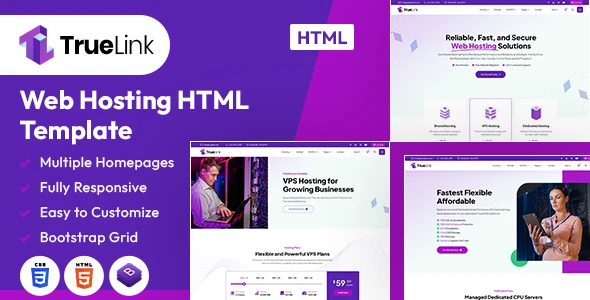
Elevate your online presence and streamline your services with the TrueLink HTML Template. Thoughtfully crafted to cater to businesses, service providers, and professional firms, TrueLink offers a perfect blend of sleek design and comprehensive functionality. This template is your pathway to building a modern, visually engaging, and highly efficient website that enhances your brand’s credibility and customer trust.
Harness the power of TrueLink’s intuitive and user-friendly interface to maximize your website’s potential. Whether you’re a seasoned entrepreneur or launching your first venture, this template is designed to suit your needs, providing a seamless and satisfying experience for you and your clients. Showcase your services, expertise, and values with professionalism and clarity.
Customize your site effortlessly with TrueLink’s flexible features. From strategic content sections to dynamic, interactive elements, this template equips you with the tools needed to develop a tailored and impactful digital strategy that aligns with your business vision.
With its responsive design, TrueLink ensures an impeccable browsing experience across all devices. Whether visitors are accessing your site from a desktop, tablet, or smartphone, your website will adjust flawlessly, boosting user engagement and satisfaction.
It contains 3 Home Page layouts and about page layout and 28 valid HTML5 page templates designs, different Blog page styles and shop pages. TrueLink template features are coded with Bootstrap Bootstrap v4.0.0, HTML5 & CSS3 and unlimited color schemes. It’s compatible with all modern browsers and search engine friendly. So showcase your artworks and services with this awesome template!
How to Edit HTML Files?
We have included 28 custom HTML templates like Home Page, About, Services, Projects and Contact etc. Please open any HTML files with a text editor like Dreamweaver, Notepad or Notepad++ and edit any lines what you want.
C) How to Edit CSS Files?
We have included some custom CSS styles like style.css (default). Please open any CSS files with a text editor like Dreamweaver, Notepad or Notepad++ and edit any lines what you want. For example if you want to edit your banner color open style.css and look at “.banner-con” for banner image and change your image.
D) How to use Color Schemes?
Please open style.css file from TrueLink/assets/css folder with a text editor and build your own colors. #5a23b1 this is our primary color, you can search and replace all to your new color code.
E) How to use On Load Animation?
We are wow.js on load animation for our website. you can edit them by simply adding or changeing the predefined classes name.
jQuery Files
assets/js/jquery-3.7.1.min.js assets/js/bootstrap.min.js js/popper.min.js js/animation.jsPhotos
Enveto Elements Freepik PhotosIcons:
Font-Awesomefont:
“Plus+Jakarta+Sans”,+sans-serifF) Resources Used
Global
Colors:
Primary: #5a23b1
Secondary: #ffffff
Text: #555555
Accent: #a919c9
Font Sizes:
h1 >> 60 h2 >> 40 h3 >> 33 h4 >> 20 h5 >> 18 h6 >> 16 p >> 16Image Links:
https://www.freepik.com/premium-vector/abstract-geometric-design-template-made-isometric-volumetric-blocks-banners-covers-backgrounds-creative-ideas_44237901.htmhttps://www.freepik.com/premium-vector/isometric-server-with-buttons-data-storage-concept_23408766.htm https://www.freepik.com/premium-vector/server-isometric-modern-style-with-light-text-eps-10_23408785.htm https://www.freepik.com/premium-vector/isometric-server-with-buttons-data-storage-concept_23408790.htm https://www.freepik.com/premium-vector/logo-technology_83218399.htm https://www.freepik.com/premium-photo/www-3d-with-colorful-background-domain-extensions_36694900.htm https://elements.envato.com/web-hosting-icon-pack-FFB9UFP https://elements.envato.com/data-storage-icon-pack-5V6YEV4 UBNG9AE”>https://elements.envato.com/collage-of-happy-multiracial-people-faces-on-gray-UBNG9AE 37JLNKY”>https://elements.envato.com/caucasian-female-engineer-using-digital-tablet-in-37JLNKY https://elements.envato.com/web-hosting-icon-pack-FFB9UFP https://elements.envato.com/data-storage-icon-pack-5V6YEV4 https://elements.envato.com/data-storage-icon-pack-5V6YEV4 https://elements.envato.com/data-storage-icon-pack-5V6YEV4 https://elements.envato.com/web-hosting-icon-pack-FFB9UFP https://elements.envato.com/web-hosting-icon-pack-FFB9UFP https://www.flaticon.com/free-icon/processor_4729735 https://www.flaticon.com/free-icon/ram-memory_5655671 https://www.flaticon.com/free-icon/hdd_5992900 https://www.flaticon.com/free-icon/speedometer_566413 https://elements.envato.com/web-hosting-icon-pack-FFB9UFP https://elements.envato.com/data-storage-icon-pack-5V6YEV4 https://elements.envato.com/web-hosting-icon-pack-FFB9UFP https://www.flaticon.com/free-icon/support_5661507 https://www.flaticon.com/free-icon/management_8283077 https://www.flaticon.com/free-icon/money-bag_8365300
Note: All images are used for preview purposes only. They are not part of the template and hence, not included in the final purchase files.
Once again, thank you so much for purchasing this template. As I said at the beginning, I’d be glad to help you if you have any questions relating to this template. No guarantees, but I’ll do my best to assist. If you have a more general question relating to the themes and templates on ThemeForest, you might consider visiting the forums and asking your question in the “Item Discussion” section.
Designing Media Team
Once again, thank you so much for purchasing this theme. As I said at the beginning, I’d be glad to help you if you have any questions relating to this theme. No guarantees, but I’ll do my best to assist. If you have a more general question relating to the themes on ThemeForest, you might consider visiting the forums and asking your question in the “Item Discussion” section.
Designing Media Team
