A) Introduction
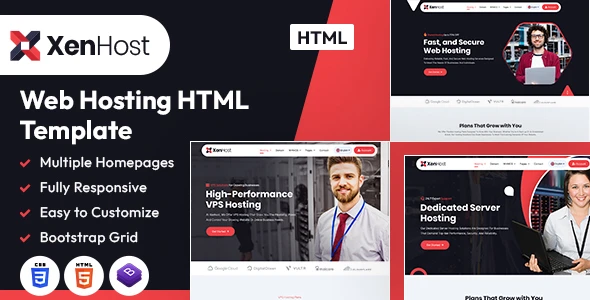
Explore the limitless potential of digital hosting with the XenHost HTML template, designed to elevate your hosting business to new heights. With a sleek, modern layout that combines clean aesthetics with powerful functionality, XenHost provides an ideal platform to showcase your services, engage clients, and establish a reliable brand identity.
Crafted for seamless user experiences, XenHost offers a visually engaging and dynamic interface that guides visitors effortlessly through your offerings. Each section is carefully optimized, allowing you to highlight hosting packages, features, client testimonials, and support resources. The template’s customization options make it easy to adapt to your specific branding, ensuring that your online presence aligns perfectly with your business goals.
Trust is built through XenHost’s responsive design, ensuring smooth, uninterrupted browsing on any device, from desktops to mobile phones. With a design optimized for all major browsers and built-in search engine compatibility, XenHost helps you connect with a broader audience and strengthens your brand’s reach.
Step into a new era of digital hosting with XenHost, a template that combines beauty and functionality, and empowers your business to thrive in today’s competitive web hosting landscape. Tailored for hosting providers of all sizes, XenHost is your gateway to a professional, impactful online presence.
It contains 3 Home Page layouts and about page layout and 28 valid HTML5 page templates designs, different Blog page styles and . XenHost template features are coded with Bootstrap Bootstrap v4.0.0, HTML5 & CSS3 and unlimited color schemes. It’s compatible with all modern browsers and search engine friendly. So showcase your artworks and services with this awesome template!
How to Edit HTML Files?
We have included 28 custom HTML templates like Home Page, About, Domain, VPS and Contact etc. Please open any HTML files with a text editor like Dreamweaver, Notepad or Notepad++ and edit any lines what you want.
C) How to Edit CSS Files?
We have included some custom CSS styles like style.css (default). Please open any CSS files with a text editor like Dreamweaver, Notepad or Notepad++ and edit any lines what you want. For example if you want to edit your banner color open style.css and look at “.home1_banner_outer” for banner image and change your image.
D) How to use Color Schemes?
Please open style.css file from XenHost/assets/css folder with a text editor and build your own colors. #ffffff this is our primary color, you can search and replace all to your new color code.
E) How to use On Load Animation?
We are aos.js on load animation for our website. you can edit them by simply adding or changeing the predefined classes name.
jQuery Files
assets/js/jquery-3.7.1.min.js assets/js/bootstrap.min.js js/popper.min.js js/animation.jsPhotos
Enveto Elements Freepik PhotosIcons:
Font-Awesomefont:
InterPoppins Plus Jakarta SansF) Resources Used
Global
Colors:
Primary: #ffffff
Secondary: #14141e
Text: #555555
Accent: #f24146
Font Sizes:
h1 >> 60 h2 >> 40 h3 >> 24 h4 >> 20 h5 >> 18 h6 >> 18 p >> 20Image Links:
https://elements.envato.com/collections/JQXGVEWMFZ?utm_source=my_collection&utm_medium=link&utm_campaign=share_collection https://elements.envato.com/smiling-technician-standing-in-a-server-room-NH8GNH2 https://elements.envato.com/young-computer-engineer-with-laptop-at-cryptocurre-V2XW297 https://elements.envato.com/young-male-it-master-checking-computer-server-conf-9MU9KU5 https://elements.envato.com/computer-network-server-room-or-data-center-3WQR749 https://www.flaticon.com/free-icon/performance_6420448 https://www.flaticon.com/free-icon/web-development_5376387 https://www.flaticon.com/free-icon/ssl_4685857 https://www.flaticon.com/free-icon/cashback_8859503 https://www.flaticon.com/free-icon/award_7441805 https://www.flaticon.com/free-icon/save-money_7435311 https://www.flaticon.com/free-icon/arrows_5205513 https://www.flaticon.com/free-icon/speedometer_8282890 https://www.flaticon.com/free-icon/laptop_5138636 https://www.flaticon.com/free-icon/custom_12371842 https://www.flaticon.com/free-icon/server_7871239 https://www.flaticon.com/free-icon/server_5869884 https://www.flaticon.com/free-icon/server_5879957 https://www.flaticon.com/free-icon/database_10424237 https://www.flaticon.com/free-icon/support_5661507 https://www.flaticon.com/free-icon/data_8601435 https://www.flaticon.com/free-icon/web-security_6575465 https://www.flaticon.com/free-icon/goal_10996325 https://www.flaticon.com/free-icon/targeting_9254658 https://www.flaticon.com/free-icon/hosting-services_10644747 https://www.flaticon.com/free-icon/call_10642547 https://www.flaticon.com/free-icon/location_3425077 https://www.freepik.com/premium-photo/man-selecting-domain-extention-by-pressing-hexagonal-button-composite-image-hand-photography-3d-background_20937617.htm#position=1&from_element=collections
Note: All images are used for preview purposes only. They are not part of the template and hence, not included in the final purchase files.
Once again, thank you so much for purchasing this template. As I said at the beginning, I’d be glad to help you if you have any questions relating to this template. No guarantees, but I’ll do my best to assist. If you have a more general question relating to the themes and templates on ThemeForest, you might consider visiting the forums and asking your question in the “Item Discussion” section.
Designing Media Team
Once again, thank you so much for purchasing this theme. As I said at the beginning, I’d be glad to help you if you have any questions relating to this theme. No guarantees, but I’ll do my best to assist. If you have a more general question relating to the themes on ThemeForest, you might consider visiting the forums and asking your question in the “Item Discussion” section.
Designing Media Team
